
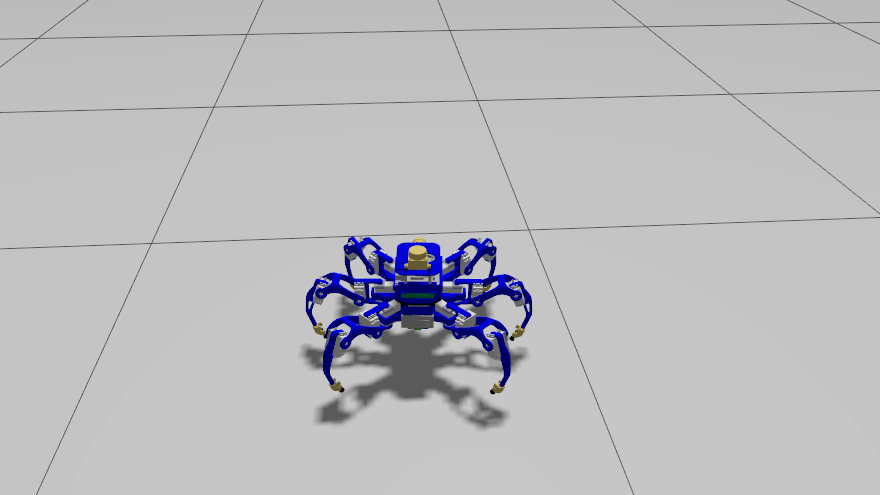
The hexapod’s body has been rebuilt from scratch to match its as-built FreeCAD assembly — every plate, board, standoff and battery placed from the CAD. Today’s job was the moment of truth: does that model actually run in Gazebo? Getting from “loads” to “walks in real time” meant working through four separate walls, none of which were bugs in the model itself.
ROS 2 Jazzy Gazebo (gz-sim) dartsim URDF / xacro gz_ros2_control
Wall #1: The model loads, but half the meshes are invisible
First launch, and Gazebo threw a fistful of errors: Unable to find file [model://hexapod_model/mesh/5V-relay.stl], and the same for the INA228 board, the lidar plate, the foot tip, and the micro-switch parts. Curiously, only some meshes failed — the older ones loaded fine.
The tell was which meshes failed: every one was a part I’d added recently. This is the classic --symlink-install trap. Colcon symlinks the files that existed at build time; anything added afterward simply isn’t in the install tree. The URDF was correct — the install directory was stale.
colcon build --symlink-install --packages-select hexapod_model to refresh the symlinks. Every mesh resolved on the next launch.Wall #2: Running at 0.7% of real time
With the meshes fixed, the sim came up — and crawled. The real-time factor sat at ~0.007. The GPU, meanwhile, was almost idle. The smoking gun was in the log:
Gazebo’s renderer couldn’t get a hardware GL context, so it silently fell back to software rendering (llvmpipe). The GPU-based lidar sensor then had to be rendered on the CPU every cycle, dragging the whole simulation to a standstill. The machine has a perfectly good NVIDIA GPU — the EGL loader just wasn’t reaching it.
Real-time factor jumped from 0.007 to 0.999. A ~140× difference from one environment variable.
Wall #3: Teaching it to take a joystick
A simulated robot you can’t drive isn’t much fun. The control path on this hexapod is a small chain of nodes, and the sim needs the same one the hardware uses:
The launch already started the joystick_node translator, but not joy_node — the driver that actually reads the gamepad. Along the way there was a great red herring: “do we need to send a stand-up command first?” It turns out the stand-up sequence only exists on the real hardware (it powers up and poses the servos); in simulation the gait drives the legs straight from the velocity command. The real reason nothing moved was a degraded, long-lived sim instance whose position controller had quietly dropped its subscription. A clean restart — and baking joy_node into the launch — and the legs moved on command.
Wall #4: 203,000 triangles resting on the floor
Everything worked… and then the real-time factor collapsed again — but this time the GPU was idle and a single CPU core was pinned at 100%. This was pure physics cost, and it was reproducible on a clean launch. The robot was standing perfectly still, so what was so expensive?
The feet. Each foot’s collision shape was the full contact-tip mesh — 33,906 triangles. Six of those, resting flat on the ground plane, is roughly 203,000 triangles in contact with the floor. Every physics step, dartsim’s collision detector generated hundreds of contact points, and its constraint solver is single-threaded — so 23 idle CPU cores couldn’t help.
Real-time factor snapped back to ~1.0, and the physics thread dropped from a pinned 100% to a comfortable ~80%. The leg-segment collision meshes stayed as-is — they never touch the ground, so they cost almost nothing.
Where it landed
The reworked hexapod now stands, senses (IMU + simulated lidar), and walks in Gazebo under gamepad control, at full real-time speed. Three fixes made it permanent: auto-starting the gamepad driver, forcing hardware rendering, and replacing the foot collisions with spheres. Every one of the four walls was an environment or collision-tuning issue — the CAD-derived model itself held up.
Next up: driving real gaits around the simulated world, and using it as a safe sandbox for the soft-touchdown footfall work before it goes back onto the physical robot.
Built and debugged with Claude Code. Real-time factors, triangle counts, and log excerpts are from the actual session on the development machine (NVIDIA RTX 5060, ROS 2 Jazzy, Gazebo / gz-sim).